Using ChatGPTfor Test Automation: Practical Applications
ChatGPT is used by millions worldwide to handle everything from daily queries to complex work challenges. No matter what industry you are in, this AI chatbot can be used as a trusted assistant that simplifies tasks, answers queries, and provides quick solutions. Its ability to understand context and respond naturally makes it more than just a chatbot, it becomes a partner that supports both learning and productivity.
In the field of software testing, ChatGPT is now being used to support test automation. It helps QA engineers write and review test cases, generate scripts, detect errors, and refine code. By doing so, it saves time and reduces manual work while maintaining accuracy in testing workflows. In this article, we explore how using ChatGPT for test automation can make testing faster, smarter, and more structured through practical examples and best practices.
What Is ChatGPT?
ChatGPT is a large language model trained through supervised and reinforcement learning on extensive datasets. It uses algorithms to study data, recognize patterns, and understand how words fit together in context. As a dialogue model, it is designed for chatting with users in a natural way. It can respond to different prompts, but it does not answer anything offensive or that breaks its guidelines.
ChatGPT can generate detailed and creative responses while explaining the reasoning behind them. It can also refer to earlier parts of a conversation to keep the discussion consistent. People use ChatGPT for a wide range of tasks, from answering technical questions about software testing to writing stories or even poems.
See also: 5 Essential Tech Tools for Designers to Speed Up Work
What Is Test Automation?
Test automation refers to the process of writing code, usually in a scripting or programming language, to automatically run test cases and verify that the application under test works as intended. It minimizes the time and effort required for manual testing, increases testing speed and accuracy, and helps maintain high software quality.
Automation can be applied to functional, regression, and performance testing. The automated test scripts interact with the application by mimicking user actions and checking the results. Common programming languages used for automation testing include Java, Python, Ruby, JavaScript, and C#.
Benefits of Using ChatGPT for Test Automation
AI-driven tools like ChatGPT have changed the way test automation works. They make the process faster, easier to manage, and more adaptable. Below are some ways ChatGPT can improve test automation workflows.
- Faster Test Script Creation: Writing automation scripts can take considerable time, but ChatGPT can generate Selenium, Appium, or Playwright scripts within moments. Whether it is for UI, API, or database testing, it provides a strong base that reduces development effort.
- Smarter Debugging and Issue Resolution: When errors occur, ChatGPT can review stack traces, suggest possible fixes, and help troubleshoot problems within the automation framework. It functions as an on-demand assistant during debugging.
- Broader Test Coverage: AI-generated suggestions make it easier to account for edge cases. ChatGPT helps identify a range of test scenarios that cover both functional and non-functional areas such as performance and security.
- Faster Test Data Creation: Creating realistic and varied data is very important for testing. ChatGPT can produce random datasets, mock API responses, or organized inputs that make tests more reliable and thorough.
- Easier Collaboration with Non-Technical Teams: ChatGPT simplifies technical ideas, making collaboration smoother among QA teams, developers, product managers, and business analysts. It can even translate plain language requirements into automated test cases.
- Shorter Learning Curve for Testers: For testers new to automation, ChatGPT acts as a mentor that explains frameworks such as Selenium, Cypress, and Playwright while guiding them through best practices and common challenges.
- Support for CI/CD Integration: ChatGPT can guide teams in setting up automation within CI/CD pipelines like Jenkins, GitHub Actions, or GitLab CI. It helps maintain consistent testing through each deployment cycle.
- Easier Maintenance of Test Scripts: As applications grow, test scripts must stay current. ChatGPT can refactor outdated code, recommend improvements, and assist in migrating to newer frameworks, keeping the automation suite dependable.
Example Use Cases of ChatGPT for Test Automation
Here are some practical ways ChatGPT can be used in automation testing.
Write Sample Test Cases with ChatGPT
ChatGPT assists developers and QA professionals in creating well-organized, clear, and detailed test cases. Whether defining test scenarios for UI, API, or performance testing, it can accelerate the process while maintaining coverage and consistency. It can generate test cases using information from user inputs, acceptance criteria, or functional requirements. This helps reduce the amount of manual work and allows technical and non-technical team members to collaborate.
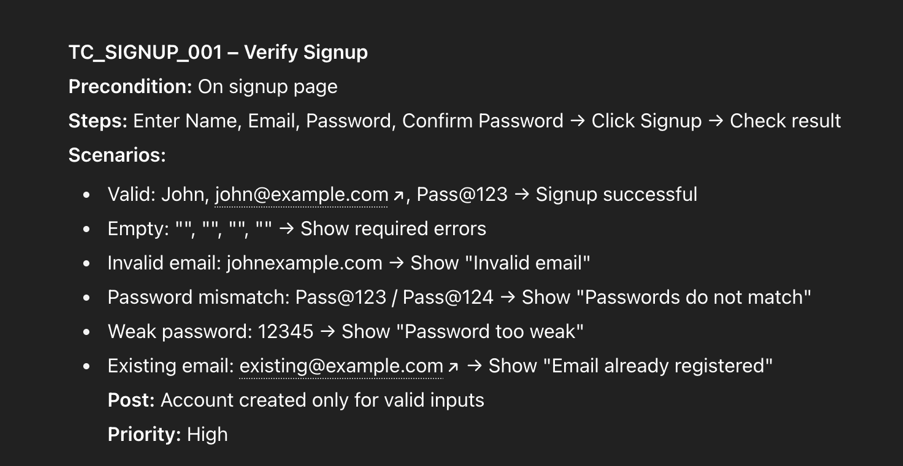
Example: Generate a Test Case for a Signup Feature
Prompt: “Write a test case that verifies the signup functionality for users using both valid and invalid input scenarios.”
ChatGPT Response:
When generating test cases, it is important to maintain and manage them regularly. Cloud-based platforms like LambdaTest provide an AI-native Test Manager that simplifies test case management.
It supports automatic test case creation both manually and through generative AI testing, along with test management, execution, and reporting all in one location. Additionally, LambdaTest Test Manager lets you run tests directly from the created test cases using its AI-native test agent, KaneAI, enabling faster and smarter quality validation through AI-driven automation.
Unit Testing with ChatGPT
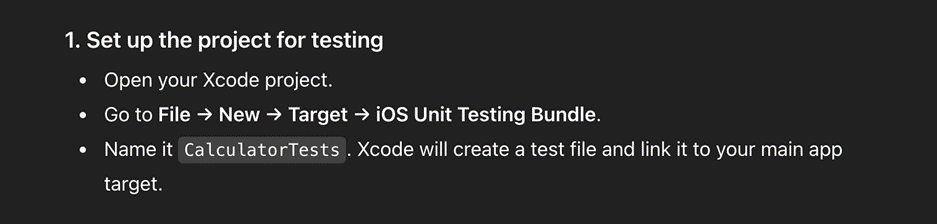
If you are new to programming and want to understand the concepts, you can ask ChatGPT to provide examples and explain how unit testing works in a popular language or framework.
Prompt: “How to write unit tests for a Calculator app in iOS using XCTest?”
ChatGPT: Responds with a detailed explanation.
Use ChatGPT to write test automation scripts in any framework.
Example: Web Testing with Cypress
ChatGPT can create complete web test scripts using Cypress.
Prompt:
“Write a Cypress test script to
- Visit the website https://www.saucedemo.com
- Verify that the login page title is ‘Swag Labs’
- Enter a standard username and password
- Click on the login button and confirm that the products page loads correctly.”
ChatGPT Response:
Generate Test Data with ChatGPT
ChatGPT can create a variety of organized test data for automation testing. It can generate random inputs, mock API responses, or prepared datasets. It can provide both valid and invalid data for different testing scenarios.
Example: Generate Random User Data for Login Testing
Prompt: “Create a set of five valid email-password combinations and five invalid combinations to test the login page.”
ChatGPT Response:
Change and Fix Code with ChatGPT
ChatGPT can guide developers and QA testers in updating, refining, and correcting test automation scripts. Whether you are debugging Selenium, Cypress, or Playwright tests, it can detect problems, suggest corrections, and restructure code for better performance.
ChatGPT can review error logs, refine locators, update old syntax, and even convert test scripts from one framework to another.
Example: Fix a Broken Selenium Test
Prompt:
“My Selenium test for adding a product to the cart is failing. Here’s the code:
| from selenium import webdriver from selenium.webdriver.common.by import By import time driver = webdriver.Chrome() driver.get(“https://automationpractice.com/index.php”) driver.find_element(By.CSS_SELECTOR, “.product-name”).lick() driver.find_element(By.name, “Submit”).click() time.sleep(8) cart_item = driver.find._element(By.CSS_SELECTOR, “.cart_description .product-name”).text assert “Printed Dress” in cart_item driver.quit() |
Please fix it.”
ChatGPT Response:
Data Analysis and Summarization
Developers and QA testers can use ChatGPT to simplify reporting and data analysis tasks, particularly those related to test automation reports.
ChatGPT can create concise summaries of test execution results, giving a clear view of the outcomes, including counts of tests that passed, failed, or were skipped.
Example: Understand Swift Crash Errors with ChatGPT
Prompt:
“Why is my Swift app crashing with this error:
| Fatal error: Unexpectedly found nil while unwrapping an Optional value let text: String? = nil print(text!) |
ChatGPT Response:
Limitations of ChatGPT for Test Automation
ChatGPT has several limitations that users should be aware of, even as its adoption continues to grow.
- Lack of Domain Expertise: While ChatGPT can produce human-like text, it may not have the deep domain knowledge or specialized expertise that a human professional brings to certain fields.
- Factual Inaccuracies: Because it is trained on vast amounts of text data, ChatGPT can sometimes reproduce errors or misinformation present in its sources.
- Code errors: The code that ChatGPT generates might not always run correctly because it may not completely understand the exact details or needs of the task. It can have mistakes or be written in a way that is not efficient. It is very important to carefully check and test the code before using it in any project.
- Biases: The model learns from a large amount of text on the internet, so it can pick up the opinions and unfair ideas that are in that text. This may cause it to produce content that can be offensive or discriminate against people.
- Limited Accountability: As a machine learning model, ChatGPT’s internal decision-making process is not fully transparent. This makes it difficult to hold the model responsible for errors or inaccuracies.
- Limited Context Understanding: ChatGPT generates responses based on the input it receives but may not completely understand the full context or intent. This can cause misinterpretation or confusion, and outputs may not always be accurate or appropriate.
Best Practices for Using ChatGPT in Test Automation
ChatGPT is a useful tool for accelerating test automation, but achieving the best results requires using it correctly.
Here are some practices to get the most from it in testing workflows.
- Provide Clear and Detailed Prompts: When asking ChatGPT to generate test scripts, troubleshoot issues, or suggest enhancements, be as detailed as possible. Include information such as the programming language, testing framework, and expected behavior.
- Review and Adjust Generated Code: ChatGPT gives a strong starting point, but always check and test the generated scripts before production use. AI-generated code can include syntax errors or logic issues that need adjustments.
- Use ChatGPT for Debugging: ChatGPT can look at error messages and give suggestions for fixing them. If a test script does not work, you can share the error message and the part of the code that is causing the problem. ChatGPT can then help find the issue and suggest ways to solve it.
- Apply ChatGPT for Test Script Improvement: ChatGPT can help make test scripts run better. It can suggest ways to reduce random failures, improve how elements are found in the code, and apply good practices like using explicit waits instead of fixed sleep times.
- Use ChatGPT for Test Case Documentation: ChatGPT can turn requirements into structured test cases, making documentation easier to maintain and verifying comprehensive coverage.
- Avoid Relying Solely on AI: AI can be a useful helper, but it cannot replace human knowledge. You should always check, review, and improve the work produced by ChatGPT to make sure it is correct and meets the needs of the business.
Conclusion
ChatGPT for test automation helps make software testing faster, more accurate, and more efficient. It can generate test cases, provide fixes, and examine data to identify potential issues. Even though it helps reduce repetitive tasks and increase coverage, human review is necessary to confirm results, refine scripts, and maintain quality.
By using clear prompts and following best practices, teams can get the most from ChatGPT for test automation and achieve reliable software testing outcomes.